Options
Newbie's Guide to the Forums - How to post pictures, post links, and turn on your private messages
 SilverEagles92
Posts: 6,787 ✭
SilverEagles92
Posts: 6,787 ✭
How to post pictures using Photobucket
If you haven't done so already, register at photobucket.com. Click Join Now to create an account.

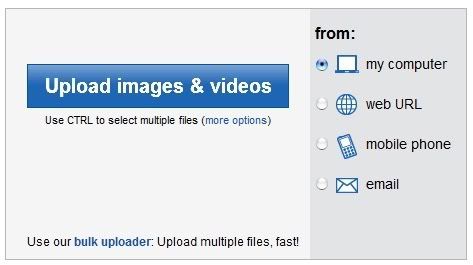
Once your account is created, head over to your album. You will see the box below. Click the blue button to begin uploading from your computer.
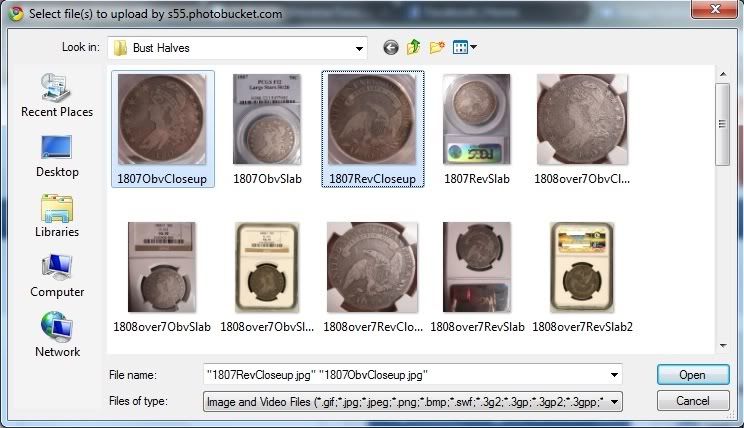
Select the files you would like to upload. To upload more than one file at a time, hold Ctrl while selecting the files.
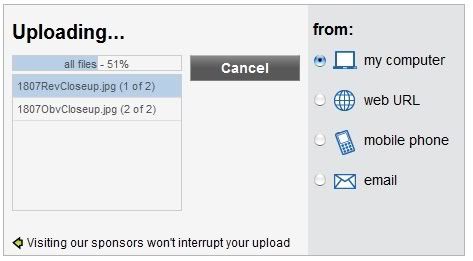
Once you've selected the files and clicked Open, the photos will begin to upload to Photobucket.
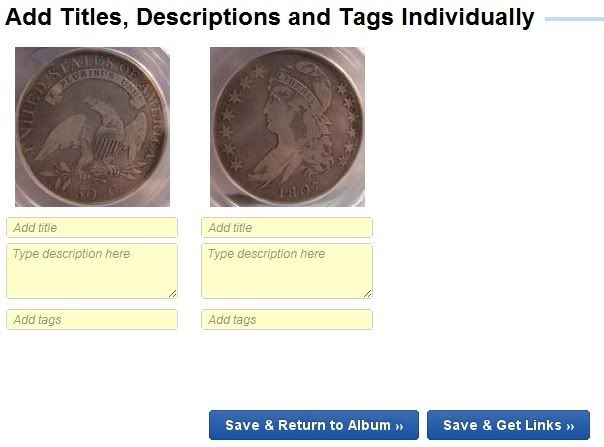
Once the files have uploaded, you will be given an opportunity to tag the photos, which isn't really necessary. Just click Save & Get Links.
On the next page, copy the IMG code. You can do this by right-clicking and selecting Copy, or Ctrl + C.
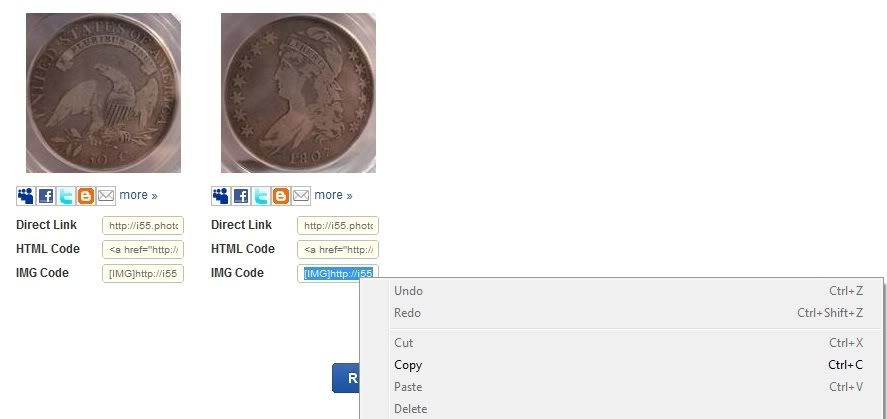
Finally, paste the IMG code in the body of a post. Once you do this, your images will show up. Each code for each images needs to be copied and pasted individually.
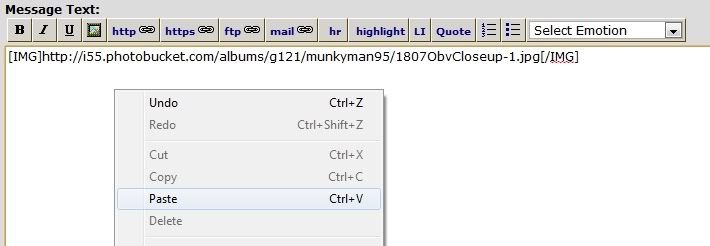
Now you have images in your posts!
How to post a link
Go to the webpage you would like to post a link to, and copy the URL. For this example, we'll use pcgs.com

Next, when you're ready to create a link in a post, click the http button.

Paste the URL into the dialog box

Click OK, then you can name your link. For example, title it "Click Here!" or whatever you like.

Now your link has been coded, when you post the message, it will show up as a Hyperlink that you can click on.

How to turn on private messages
To turn on Private messages, find the button called 'Profile' in the upper right-hand corner of any forum window.

Scroll down until you see this:

Next to 'Allow Private Messages' click On
To send someone a private message, you simply click on the padlock icon at the upper right-hand corner of any of the member's posts. For instance, if you were to click the padlock icon on this post, the private message would be sent to me.

If you haven't done so already, register at photobucket.com. Click Join Now to create an account.
Once your account is created, head over to your album. You will see the box below. Click the blue button to begin uploading from your computer.
Select the files you would like to upload. To upload more than one file at a time, hold Ctrl while selecting the files.
Once you've selected the files and clicked Open, the photos will begin to upload to Photobucket.
Once the files have uploaded, you will be given an opportunity to tag the photos, which isn't really necessary. Just click Save & Get Links.
On the next page, copy the IMG code. You can do this by right-clicking and selecting Copy, or Ctrl + C.
Finally, paste the IMG code in the body of a post. Once you do this, your images will show up. Each code for each images needs to be copied and pasted individually.
Now you have images in your posts!
How to post a link
Go to the webpage you would like to post a link to, and copy the URL. For this example, we'll use pcgs.com
Next, when you're ready to create a link in a post, click the http button.
Paste the URL into the dialog box
Click OK, then you can name your link. For example, title it "Click Here!" or whatever you like.
Now your link has been coded, when you post the message, it will show up as a Hyperlink that you can click on.
How to turn on private messages
To turn on Private messages, find the button called 'Profile' in the upper right-hand corner of any forum window.
Scroll down until you see this:
Next to 'Allow Private Messages' click On
To send someone a private message, you simply click on the padlock icon at the upper right-hand corner of any of the member's posts. For instance, if you were to click the padlock icon on this post, the private message would be sent to me.

0
Comments
Many members on this forum that now it cannot fit in my signature. Please ask for entire list.
How big a picture can I post? how many big pictures will the free account hold?
thanks, looking forward to posting big pics this weekend!
Liberty: Parent of Science & Industry
To support LordM's European Trip, click here!
"Everything is on its way to somewhere. Everything." - George Malley, Phenomenon
http://www.american-legacy-coins.com
how about another thread on
how to post links
perhaps as part of an
introduction to the forum
welcome package
<< <i>The free account lets you upload up to 1MB flie size, and I'm not sure how much bandwidth you get. I have over 500 images currently with no problems. >>
Currently, free users are able to have up to 500 MB storage, and 10 GB bandwidth a month. It used to be 1GB storage and 25GB bandwidth, but it was reduced
Photobucket is awesome for storing your photos for eBay and posting here. To give an example, 10GB of bandwidth will allow a photo, approximately 100Kb in size to be viewed about 100,000 times before the bandwidth is maxed out.
I was working on a post myself on how to use Photobucket to save on eBay fees, so I hope I wouldn't be stepping on SE92's post too much!
Thanks for the great post!
we recently had a discussion here about copyright laws that had everyone whipped up in a frothy frenzy, now this. man, i really, truly do love this place!!
Anyone know?
To support LordM's European Trip, click here!
<< <i>I don't know if screenshots fall in to the same category.
Anyone know? >>
I am sure it is fine for an educational post.
Unless you're trying to sell me a Chevy - then you owe Photobucket for the advertising.
Edited to add - very nice job aide.
To support LordM's European Trip, click here!
Thanks for the refresher course.
Regards, Larry
<< <i>Added "How to post links" and "How to turn on private messages" >>
Why don't you contact the moderators to see if this thread can be saved somewhere
for the information of new members.
R.I.P. Bear
The Penny Lady®
To support LordM's European Trip, click here!
Thank you for walking us newbs through the process.
-Robert
<< <i>Regarding PM's, is there a way to get an email notification when you have a PM? >>
....i don't think there is. just have to log in from time to time and watch for the blinkin' padlock!
Hoard the keys.
Thanks for reposting it, Smokin
In honor of the memory of Cpl. Michael E. Thompson
AB
INYNWHWeTrust-TexasNationals,ajaan,blu62vette
coinJP, Outhaul ,illini420,MICHAELDIXON, Fade to Black,epcjimi1,19Lyds,SNMAN,JerseyJoe, bigjpst, DMWJR , lordmarcovan, Weiss,Mfriday4962,UtahCoin,Downtown1974,pitboss,RichieURich,Bullsitter,JDsCoins,toyz4geo,jshaulis, mustanggt, SNMAN, MWallace, ms71, lordmarcovan,JWP,dantheman984,olah_in_MA,USMC_6115
In honor of the memory of Cpl. Michael E. Thompson
<< <i>How do you put the emoticon things into a post? Thanks!! >>
Raufus, after you hit "reply" there will be a drop down box in the far right of the little tool bar that says "Select Emotion." Hit the down arrow and you should see them....
<< <i>I have tried changing the "customize your upload options" to a variety of sizes in photobucket. >>
This is what I do. Not sure why you can't get them bigger this way. I, usually, go with something in the middle.
<< <i>Is 100X75 bigger or 2048X1536? >>
The bigger number is a bigger pic.
<< <i>Chad was one of the good guys who we lost far too soon. >>
Yep he was a good kid. I used this post myself back a year and a half or so really was helpful.
<< <i>
<< <i>How do you put the emoticon things into a post? Thanks!! >>
Raufus, after you hit "reply" there will be a drop down box in the far right of the little tool bar that says "Select Emotion." Hit the down arrow and you should see them.... >>
Thanks so much!!!!
How sad about Chad.
Hoard the keys.
Interests:
Pre-Jump Grade Project
Toned Commemoratives