(Re)Discovering OttLite
 mercurydimeguy
Posts: 4,634 ✭✭✭✭
mercurydimeguy
Posts: 4,634 ✭✭✭✭
OK, quick story first...
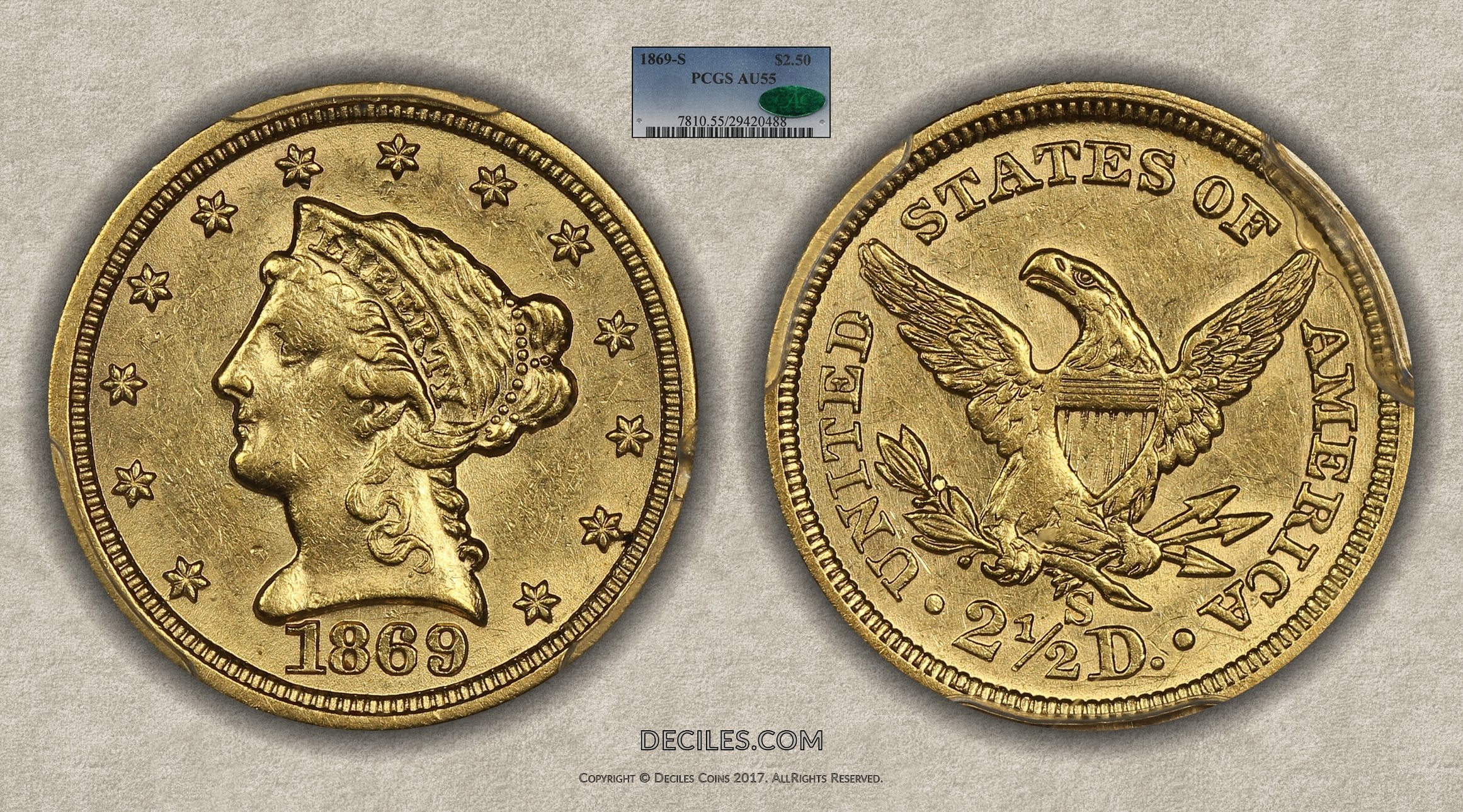
Neil Musante visited with me last week and we talked about photography. He suggested Ott lamps, and ding a light bulb went off (no pun intended). I used to use an Ott lamp back in 2005-2006 time frame and loved it but then misplaced it in my house. A quick visit to Amazon and I was buying 2 Architect Lamps and 2x Ott 25W (I00W effective) light bulbs. The setup came it today and I just snapped up this pic with zero editing, literally point and shoot (of course, I manually set white balance cause the Ott lights are very cool).
The OTT light bulbs are 1,600 lumens each so they provide an immense amount of light, which means I can shoot at my favorite F/6.3 but like at 1/80 shutter speed instead of the usual 1/15 with normal bulbs. Plus the Ott light is like Sunlight, very natural...
PS. I chose this coin as a test subject because it is nearly impossible to image for reason I won't go into here...
Comments
Can you use the bulb in any lamp, or is there a reason to use that lamp in particular? Great quality pic. Also, what are you using to take the pictures?
@basetsb_coins on Instagram
Any lamp. It's a normal bulb size, which is great.
I bought those new architect lamps cause the ones I had were falling apart and would hold in a position anymore (super annoyinng).
What do you use to take the pictures?
@basetsb_coins on Instagram
Canon SL1 Body
Canon EF 100mm IS macro lens
In terms of the lens, one can use the non-IS version of the same lens for a lot less money.
There are myriad of options, but this has worked for me the last 1+ years (I upgraded to this setup about a year ago).
Sunlight has an average color temperature of 5500k. Ott-brand LEDs can have temps of 2700k, 4000k, and 5000k, the latter being closest to direct sun.
Her> @RogerB said:
This 25W version is 5,850k and 1,600 lumens.
By the way, here's a silver coin I imaged using the new lights.
Nice photos.
With "dayight" color temperature, intensity is only meaningful in relation to exposure time and lens opening options. Illumination of the coin is controlled by source size relative to the coin and angle, combined with reflective characteristics of the coin.
I use an Ott light to look for friction on the high points of coins.
I'm going to give those a shot. The IKEA lights I am currently using seem to result in underexposed pics.
“In matters of style, swim with the current; in matters of principle, stand like a rock." - Thomas Jefferson
My digital cameo album 1950-64 Cameos - take a look!
The brand of light has nothing to do with exposure....that is a function of camera lens aperture and shutter speed.
That has not been my experience at all. IKEA lights (which I also own) at low shutter speed, and Ott lights at higher shutter speed will make the coin look VASTLY different, it's not plug and play at all. I have spent $300-$400 on different kind of lightbulbs over the years and can tell you first hand it is 100% different for every kind of light source. The coin at the same level of "visual" brightness (e.g. an coin image to the observer that has the same level of brightness) will look different depending on light source.
Thanks Roger - I guess I knew that but get a bit frustrated from time to time.
Here are the setting for my setup. Nikon D90 with Sigma 150mm macro. I'm posting them here in the spirit of sharing and others being able to learn.
Height about 21 inches on the copy stand
Three Ikea LED lights at 12, 4, and 8 o’clock – up near camera
Aperature priority
Focus manually on TV – via tethering
F5.6 to 6.3
Shutter speed is automatic but typically 1/40 th second
No flash
Used grey card to set white balance.
ISO 200
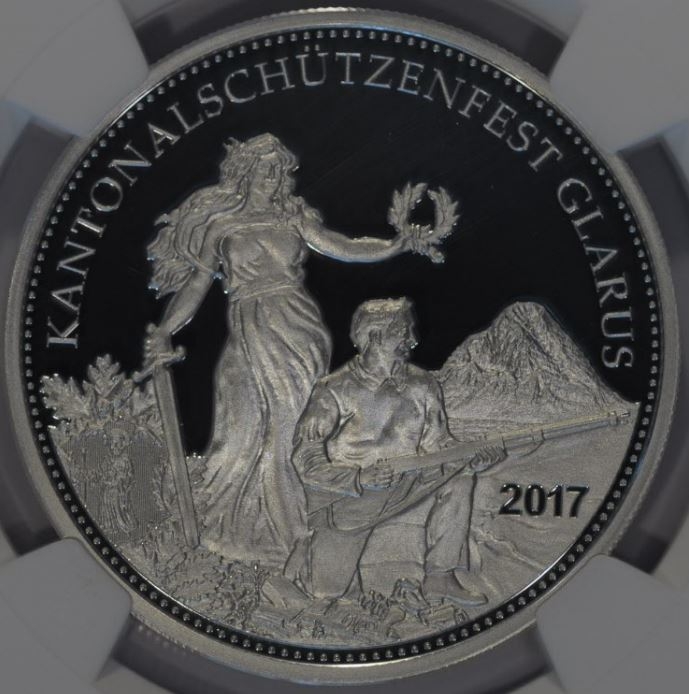
The images look wonderful on the TV but once I look at them on the computer they appear underexposed.
Do you have any suggestions?
Typical image
“In matters of style, swim with the current; in matters of principle, stand like a rock." - Thomas Jefferson
My digital cameo album 1950-64 Cameos - take a look!
Reading this thread just makes me more determined to not mess with coin photography.... Not only would I get an inferior picture, but then I would have multiple suggestions to improve the lighting, angles and reflections... followed by recommendations for this bulb, that lens, this set up and the proper wine to drink while doing it. Cheers, RickO
@Cameonut they are underexposed...here's the scoop...
TV's and Monitors are set to what has generically become knows as "Best Buy" mode. They are not calibrated...they are set to the wildest colors and obscene brightness/contrast level to get you to notice them as you walk down the isle. E.g. while there are a few exceptions, by and large today's TV and Monitor images look nothing like real life (I will come back to this in a moment). Conversely, when you have a laptop display, for example, it's settings are 99% fixed (e.g. only brightness can be changed by pushing buttons) and calibrated to the display (in the display control panel you'll see various calibration settings, there is usually one there for LCD display). So the laptop displays are fairly calibrated, allowing you to change brightness to your preference.
No let's get back to monitors...most monitors have a calibration setting that the computer will download when you plug in the monitor (or computer already has it) and will match the display settings so once again, the monitor can have better calibration than out of the box. You can always look for the best calibration settings for your monitor online and plug them in. More on monitor calibration settings here...
This leaves TV's and here you need to do some Googling to find your set and the calibrating settings. I uses www.rtings.com since they have the largest collection of TV calibration settings, which means you don't have to pay an ISF Certified technician to come and calibrate your new LCD TV (about $500)...for free you can get 90%+ of the same by simply plugging in the numbers they give you. Here are my TV settings for example. WARNING: you will immediately hate your TV as soon as you do this, but within a day/two, your eye will get used to it, and you will realize what it should have looked like along and be po'd You will never again be able to enjoy an uncalibrated look, because uncalibrated TVs look like you are watching a cartoon, not real people.
Anyhow, this is a long-winded explanation for (also) what some of you will reference is "the photo looked nothing like the coin in hand"...while some of this is photographic shenanigans, often it is monitor calibration.
My recommendation... calibrate all your displays and you'll get closer to a consistent look across all of them.
Hope this has been helpful...
Cameonut:
This is your culprit: "Shutter speed is automatic but typically 1/40 th second."
Your camera's exposure system is calibrated to produce good exposures for average subjects. But a coin is not "average" - it is much brighter than a typical scene. The camera compensates for the coin being "too bright" by reducing exposure time to something the camera "thinks" is normal. Hence, you get an underexposed image.
To correct, all you have to do is set the exposure time manually, as you do with the aperture. This will usually give much improved photos when your camera indicates "over exposure" by about 1 to 1.5 f-stop. From your example put your lens on f5,6 and the shutter speed on 1/15-sec. (This is about 1.5 stops more exposure than in your posted data.) The resulting photo should look good on your computer. (The TV ? is only useful for confirming focus and composition - not for final image quality.)
You could also correct the photo in imaging software, but it's better if the original is correct to begin with. Fringe images on this example are likely from internal reflections off the plastic holder surfaces.
Mercurydimeguy --
RE: "That has not been my experience at all."
Light is light. Unless there is something unusual about the light source - such as flickering mercury vapor or fluorescent lamp combined with a fast shutter speed - all continuous light sources follow identical physical laws. That your photos look different depending on the brand or spectral distribution of the source is an entirely separate matter from the physics.
For example, if your Ikea brand lights have a wavelength curve that is dominated by green (~ 560–520 nm) and the Ott light has a flat curve, then the light reflected from a coin will have an analogously distorted curve, i.e.: it will not "look right." This is the reason for my earlier comment about color temperature and other posts about using lights with a curve that emulates standard daylight.
@RogerB I agree with the science but want to simplify for the audience... if you take a 100W equivalent CFL, Halogen, etc, and you manually set white balance, setting color aside for a moment, the coin will have a different look regardless. One will show metal flow different than another... so all I'm saying is (in layman terms) lightbulb selection will have an impact on what your coin looks like (color aside).
Nope.
What you are seeing are differences caused by the apparent diameter of the light source relative to coin diameter, plus any ambient diffusion or scatter. (Assuming lighting angles are the same.) As far as white balancing goes, it does not correct for non-linear spectral output of the light source. A CFL and a haolgen and an Ott will all give different results because the fundamental light spectra are different....but that is not intensity (lux). (We'll omit the problems of human light and color perception....)
To summarize: All other factors being equal, the intensity of light sources is immaterial. All brands of lamps, other factors being equal, will give identical results.
But -- no matter. What counts is that you like your results.
That's all I was saying, is that one is not better than another, but that end results will be different. Through imaging 10's of thousands of coins over the years, my preference is for a look that resembles the coin in hand...that's what I strive for, and I can tell you that to my 48 year old eyes, the 25W (100W effective) Ott light (now that I came back to it) does that and also it lights up the coin's surface better than other lights (maybe because of the physical bulb's dimensions, who knows, but it ust does)...
Good stuff...thanks for sharing the science, I learned something
@mercurydimeguy
Thanks for the feedback on monitors. More than I'll probably ever use but handy to have. I have dabbled a bit with calibrating my computer monitors, I guess it makes sense to calibrate the TV as well.
Frankly, the main reason why I tether the TV to the camera is that it makes is much easier to manually focus on the coin. The larger image is easy to see compared to the small LCD on the camera at a bit of an odd angle. I then release the shutter with a remote. So I think I am doing OK with respect to focus - color is a different animal I will be playing with later this year on some toned coins.
“In matters of style, swim with the current; in matters of principle, stand like a rock." - Thomas Jefferson
My digital cameo album 1950-64 Cameos - take a look!
@RogerB
Your commentary was most helpful to me. Understanding WHY the images come out the way they do is what helps me learn how to tweak the settings. I'll be looking forward to lengthening the shutter speed to see how things work out.
And I agree that it is much better to take the photos correctly in the first place vs processing them after the fact. To be honest, I actually took a class in Photoshop Elements 10 at the local community college so I could "fix" coin photos.
Thanks for the assistance. And I hope others will chime in so we can all learn something.
“In matters of style, swim with the current; in matters of principle, stand like a rock." - Thomas Jefferson
My digital cameo album 1950-64 Cameos - take a look!