Home U.S. Coin Forum
Options

Critique my pic

tydyetydye Posts: 3,894 ✭✭✭
I always take lousy pics even though I have a decent camera. Purchased a new lens this weekend. Picture still kind of flat though. But i think it is better for me.

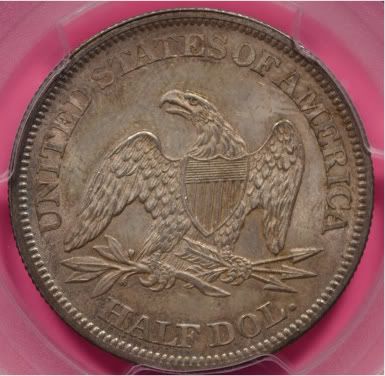
imageimage

Comments

  • Options
    blu62vetteblu62vette Posts: 11,968 ✭✭✭✭✭
    Not bad at all, I think the coin would stand out better with a white piece of paper under the slab.
    http://www.bluccphotos.com" target="new">BluCC Photos Shows for onsite imaging: Nov Baltimore, FUN, Long Beach http://www.facebook.com/bluccphotos" target="new">BluCC on Facebook
  • Options
    CaptHenwayCaptHenway Posts: 33,852 ✭✭✭✭✭
    Not too bad. Agree on lose the pink.

    Numismatist. 54 year member ANA. Former ANA Senior Authenticator. Winner of four ANA Heath Literary Awards; three Wayte and Olga Raymond Literary Awards; Numismatist of the Year Award 2009, and ANA Lifetime Achievement Award 2020. Also won the PNG's Robert Friedberg Award for "The Enigmatic Lincoln Cents of 1922," Available now from Whitman or Amazon.
  • Options
    ebaybuyerebaybuyer Posts: 2,984 ✭✭✭
    definately use a lighter colored background, and if that color is anywhere near true, that is one very nice coin !
    regardless of how many posts I have, I don't consider myself an "expert" at anything
  • Options
    lasvegasteddylasvegasteddy Posts: 10,487 ✭✭✭
    not that i can image a coin for the life of me

    i think your image is a great in hand look...not mega high rez barely fit my monitor type

    i bet that's exactly what it looks like in hand in general lighting

    great job...image
    everything in life is but merely on loan to us by our appreciation....lose your appreciation and see


  • Options
    tydyetydye Posts: 3,894 ✭✭✭
    Thanks. I will give a go with a white background.

  • Options
    tydyetydye Posts: 3,894 ✭✭✭
    White background. Suggestion on how to bring out the luster? Must I tilt it a bit?
    imageimage
  • Options
    tydyetydye Posts: 3,894 ✭✭✭
    You guys sure about the background? Just looking at the coin - the one with the pink background looks more like the coin. I just need to capture the luster better.
    How about another color background? I have just about every color from my kids construction paper.
  • Options
    joeykoinsjoeykoins Posts: 18,474 ✭✭✭✭✭
    Not bad!There's one thing wrong.That coin should be in "My Camera,in My collection!"imageDo you know of the "cigarette"version?Check it out.Nice pic's!

    "Jesus died for you and for me, Thank you,Jesus"!!!

    --- If it should happen I die and leave this world and you want to remember me. Please only remember my opening Sig Line.
  • Options
    lasvegasteddylasvegasteddy Posts: 10,487 ✭✭✭
    you can get fancy and make .gif out of a couple images to show what a coin looks like with cartwheel blaring or to show off luster/color
    pretty simple too
    image

    http://gickr.com
    everything in life is but merely on loan to us by our appreciation....lose your appreciation and see


  • Options
    keyman64keyman64 Posts: 15,650 ✭✭✭✭✭
    Not bad. I always use a white background when shooting the coin then when I edit I put the coin on a black background...just me and a ton of other people.

    Nice coin. Too bad it isn't from a few years earlier with an 'S'. image Nice one!
    "If it's not fun, it's not worth it." - KeyMan64
    Not really looking for much these days but if I were, it might be a toner. :smile:
  • This content has been removed.
  • Options
    lcoopielcoopie Posts: 8,875 ✭✭✭✭✭
    what settings are you using?

    I think the photo should be larger than posted, but not huge, perhaps 50% larger, to demonstrate the coin better for those of us who are older.
    LCoopie = Les
  • Options
    tydyetydye Posts: 3,894 ✭✭✭
    Some gold
    Need to retake the reverse - blurry. Stupid question. When looking though the view finder. Do you keep your glasses on? I would assume not since I am near sighted only.
    imageimage
    imageimage
  • Options
    tydyetydye Posts: 3,894 ✭✭✭
    thanks lasvegasteddy. That is cool.
  • Options
    mrpaseomrpaseo Posts: 4,753 ✭✭✭
    Love the pink, go with it, keep the pink no matter what you do...lol. Yes, the pink is the first thing I focused on too. I tell you this, if you always used pink in your back round for your auctions you would definitely be remembered. Might help, might not help...lol.

    I think the goal for pictures is two fold.

    1. We want to capture what the coin actually looks like. (Over all) With this we want to capture the true eye of the coin.

    2. We want our picture to show a specific attribute of our coins (A trouble area etc.) With this, we might adjust the light to accent the area.

    Personally, I like photo's a bit larger than what you offered.


    The coin looks good though,
    Ray
  • Options
    tydyetydye Posts: 3,894 ✭✭✭
    I actually went with the pink because I figure no one else would have it and it would be easy to id my listings. I have plans to sell some coins this month on the bay - not any of these though - these are keepers.
  • Options
    richardshipprichardshipp Posts: 5,647 ✭✭✭
    How 'bout black background? Nice Coin btw!

    image
  • Options
    lcoopielcoopie Posts: 8,875 ✭✭✭✭✭
    have you read Mark Goodmans book on coin photography?
    LCoopie = Les
  • Options
    mrpaseomrpaseo Posts: 4,753 ✭✭✭


    << <i>I actually went with the pink because I figure no one else would have it and it would be easy to id my listings. I have plans to sell some coins this month on the bay - not any of these though - these are keepers. >>


    Photo the coin with the back round that shows the coin the best. Then photo shop it onto the Pink back round (If that is the color you want).

  • Options
    lasvegasteddylasvegasteddy Posts: 10,487 ✭✭✭
    one last lil hijack but to give a better feel...
    image
    everything in life is but merely on loan to us by our appreciation....lose your appreciation and see


  • Options
    tydyetydye Posts: 3,894 ✭✭✭
    imageimage
  • Options
    tydyetydye Posts: 3,894 ✭✭✭
    imageimage
  • Options
    tydyetydye Posts: 3,894 ✭✭✭
    I did purchase Mark's book. But have not sat down and read it though yet. I dont read directions a Christmas time for my kids gifts either LOL. I have the day off so I am going to read along with a book I purchased at BN on my specific camera. So these pics are my current baseline. Hopefully I can improve by the end of the day
  • Options
    LindeDadLindeDad Posts: 18,766 ✭✭✭✭✭
    High angle lighting, Lights close to the camera will help bring out the luster.
    image
  • Options
    MilkmanDanMilkmanDan Posts: 3,768 ✭✭✭✭✭
    The peace dollar is not bad, you're getting there. As others have said, read Mark Goodman's book.

    Another reason to use a white background is that you can use it to help adjust white balance later. You can always crop onto a different colored background later.
  • Options
    lcoopielcoopie Posts: 8,875 ✭✭✭✭✭
    are you in macro setting?

    did you set the white balance manually?

    are you using a copy stand?

    are you triggering your shutter remotely or by delay?
    LCoopie = Les
  • Options
    tydyetydye Posts: 3,894 ✭✭✭


    << <i>are you in macro setting?

    did you set the white balance manually?

    are you using a copy stand?

    are you triggering your shutter remotely or by delay? >>


    No just manual

    Yes I set the white balance with a sheet of white paper

    I dont have a copy stand - but am using a tripod

    No - I have a delay I will try that next

    Thanks for the advice
  • Options
    lcoopielcoopie Posts: 8,875 ✭✭✭✭✭
    use your macro setting, that is for focusing close, it usually looks like a flower
    LCoopie = Les
  • Options


    << <i>Not bad at all, I think the coin would stand out better with a white piece of paper under the slab. >>


    I like the white paper better. It makes the coin's fetters stand out more.
  • Options
    NeoStarNeoStar Posts: 1,123 ✭✭✭
    High angle lighting, Lights close to the camera will help bring out the luster.

    This. Like others mentioned, using a delay would also help.
  • Options
    UtahCoinUtahCoin Posts: 5,366 ✭✭✭✭✭
    Here's your first coin with the colors tweaked in Photoshop.

    image
    I used to be somebody, now I'm just a coin collector.
    Recipient of the coveted "You Suck" award, April 2009 for cherrypicking a 1833 CBHD LM-5, and April 2022 for a 1835 LM-12, and again in Aug 2012 for picking off a 1952 FS-902.
  • Options
    messydeskmessydesk Posts: 20,737 ✭✭✭✭✭
    Regarding the OP coin, now that you've lost the pink background, you need a "harder" (more contrasty) light to bring out luster where it is overly subdued. Do this by making your light source smaller, either by moving it away from the coin or by blocking part of it. Either way, you'll increase your exposure time. As an increased exposure time makes your picture more susceptible to ambient room light, you'll have to make sure other light sources are neutralized. Also, make sure you are not using the auto white balance.
  • This content has been removed.
  • Options
    coindeucecoindeuce Posts: 13,510 ✭✭✭✭✭
    I've used a matte black background on silver coins, and thought it brought out the natural color of a toned silver coin most effectively. The lighting is much more critical though.

    "Everything is on its way to somewhere. Everything." - George Malley, Phenomenon
    http://www.american-legacy-coins.com

Leave a Comment

BoldItalicStrikethroughOrdered listUnordered list
Emoji
Image
Align leftAlign centerAlign rightToggle HTML viewToggle full pageToggle lights
Drop image/file