Home U.S. Coin Forum
Options

New Diffuser setup - TV-like slab pic

rmpsrpmsrmpsrpms Posts: 1,975 ✭✭✭✭✭

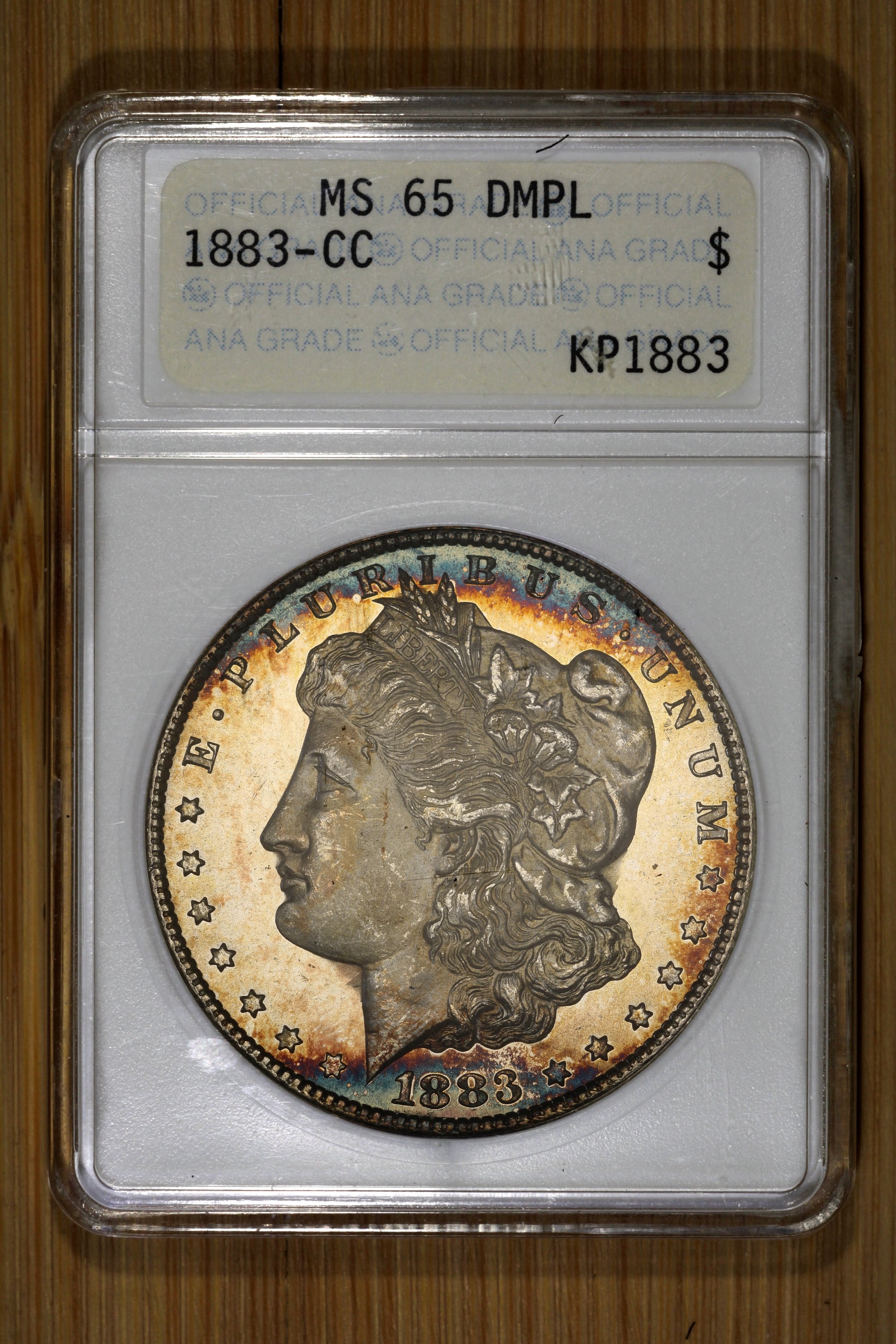
I've had trouble imaging this 1883-CC MS65 DMPL (ANACS old holder) ever since I got it. A client asked that I put together a system for them which could emulate old True Views, and I figured out a specialized diffuser that seemed to do the job. I used this 1883-CC as an example and we were both pleased with the results. Here is a "Slab Glamor Shot", which is an overall pic of the slab with the special-diffuser coin photo pasted-in:
PM me for coin photography equipment, or visit my website:

http://macrocoins.com

Comments

  • Options
    MsMorrisineMsMorrisine Posts: 39,600 ✭✭✭✭✭

    great coin photo but don't understand putting separate photos together

    Current maintainer of Stone's Master List of Favorite Websites // My BST transactions
  • Options
    rmpsrpmsrmpsrpms Posts: 1,975 ✭✭✭✭✭

    @MsMorrisine said:
    great coin photo but don't understand putting separate photos together

    Sort of a "best of both worlds" composition. It's impossible to get a good overall picture of the slab simultaneously with the coin since they require different lighting to avoid glare and such.

    PM me for coin photography equipment, or visit my website:

    http://macrocoins.com
  • Options
    fathomfathom Posts: 2,153 ✭✭✭✭✭

    Nice.

  • Options
    FlyingAlFlyingAl Posts: 4,413 ✭✭✭✭✭

    @MsMorrisine said:
    great coin photo but don't understand putting separate photos together

    That’s the industry standard.

  • Options
    ProofCollectionProofCollection Posts: 7,933 ✭✭✭✭✭

    Maybe a picture of your photography setup would be helpful to envision what you've done.

  • Options
    rmpsrpmsrmpsrpms Posts: 1,975 ✭✭✭✭✭

    @FlyingAl said:

    @MsMorrisine said:
    great coin photo but don't understand putting separate photos together

    That’s the industry standard.

    Actually, this is probably closer to industry standard:

    PM me for coin photography equipment, or visit my website:

    http://macrocoins.com
  • Options
    cheezhedcheezhed Posts: 6,333 ✭✭✭✭✭

    Interesting result. I'd like more details.

    Many happy BST transactions
  • Options
    rmpsrpmsrmpsrpms Posts: 1,975 ✭✭✭✭✭

    @ProofCollection said:
    Maybe a picture of your photography setup would be helpful to envision what you've done.

    @cheezhed said:
    Interesting result. I'd like more details.

    I described the process on this form perhaps 10 years ago, but it is basically "tilted pseudo-axial" photography. Tilt the coin a bit into the light to reflect off the coin into the camera. This brings out the deep toning colors and gives a bright reflective field to proofs/prooflikes. There are some tricks of course to getting rid of the glare...

    PM me for coin photography equipment, or visit my website:

    http://macrocoins.com
  • Options
    DesertCoinDesertCoin Posts: 430 ✭✭✭

    How do you combine the photos? Also interested in such equipment.

    “Land of the free because of the brave”
    “Saved by grace alone, through faith alone, in Christ alone”
    In Deo solo confidimus
    ΙΧΘΥΣ
    ΙϹ ΧϹ ΝΙΚΑ (ΙΗΣΟΥΣ ΧΡΙΣΤΟΣ ΝΙΚΑ)


    Member since 2026
    Successful BST transactions with: Ted 1, JWP, bigjpst, Vetter, nickelsciolist, ajaan,
  • Options
    rmpsrpmsrmpsrpms Posts: 1,975 ✭✭✭✭✭

    @DesertCoin said:
    How do you combine the photos? Also interested in such equipment.

    I just used Paint.net to combine the photos.

    Open the high res coin photo
    Circle crop around the coin and copy to clipboard
    Open the slab photo
    Paste the cropped coin as "new layer" and move it over the coin in the slab and adjust it to size

    To get these results, depending on what you are using now, it may be as simple as adding a diffuser to your existing setup.

    PM me for coin photography equipment, or visit my website:

    http://macrocoins.com
  • Options
    skier07skier07 Posts: 4,781 ✭✭✭✭✭

    @rmpsrpms said:

    @DesertCoin said:
    How do you combine the photos? Also interested in such equipment.

    I just used Paint.net to combine the photos.

    Open the high res coin photo
    Circle crop around the coin and copy to clipboard
    Open the slab photo
    Paste the cropped coin as "new layer" and move it over the coin in the slab and adjust it to size

    To get these results, depending on what you are using now, it may be as simple as adding a diffuser to your existing setup.

    If I’m going to spend a lot of money on a coin with “fancy” pictures there’s a lot to be said about viewing the coin in hand or having good return privileges. I see lots of online images from the same group of dealers and there’s no way the coin looks that way in hand unless it’s imaged with perfect lighting and tilted or the images are processed.

  • Options
    rmpsrpmsrmpsrpms Posts: 1,975 ✭✭✭✭✭

    @skier07 said:
    If I’m going to spend a lot of money on a coin with “fancy” pictures there’s a lot to be said about viewing the coin in hand or having good return privileges. I see lots of online images from the same group of dealers and there’s no way the coin looks that way in hand unless it’s imaged with perfect lighting and tilted or the images are processed.

    Sure, but that is indeed the way the coin looks in-hand, just not with a simple single glaring lighting setup.

    PM me for coin photography equipment, or visit my website:

    http://macrocoins.com

Leave a Comment

BoldItalicStrikethroughOrdered listUnordered list
Emoji
Image
Align leftAlign centerAlign rightToggle HTML viewToggle full pageToggle lights
Drop image/file